How I built a 3D museum as a website, with Blender scripts and three.js
Take a look at the portfolio websites of software studios and creative agencies today. Almost without exception, they follow the exact same visual template: an oversized bold headline in Inter or Neue Haas Grotesk, a subheadline promising "digital transformation," a floating 3-card feature grid with subtle backdrop blur, a carousel of monochrome logos, and a Calendly embed pinned to the bottom. They are clean, polite, completely functional, and utterly forgettable.
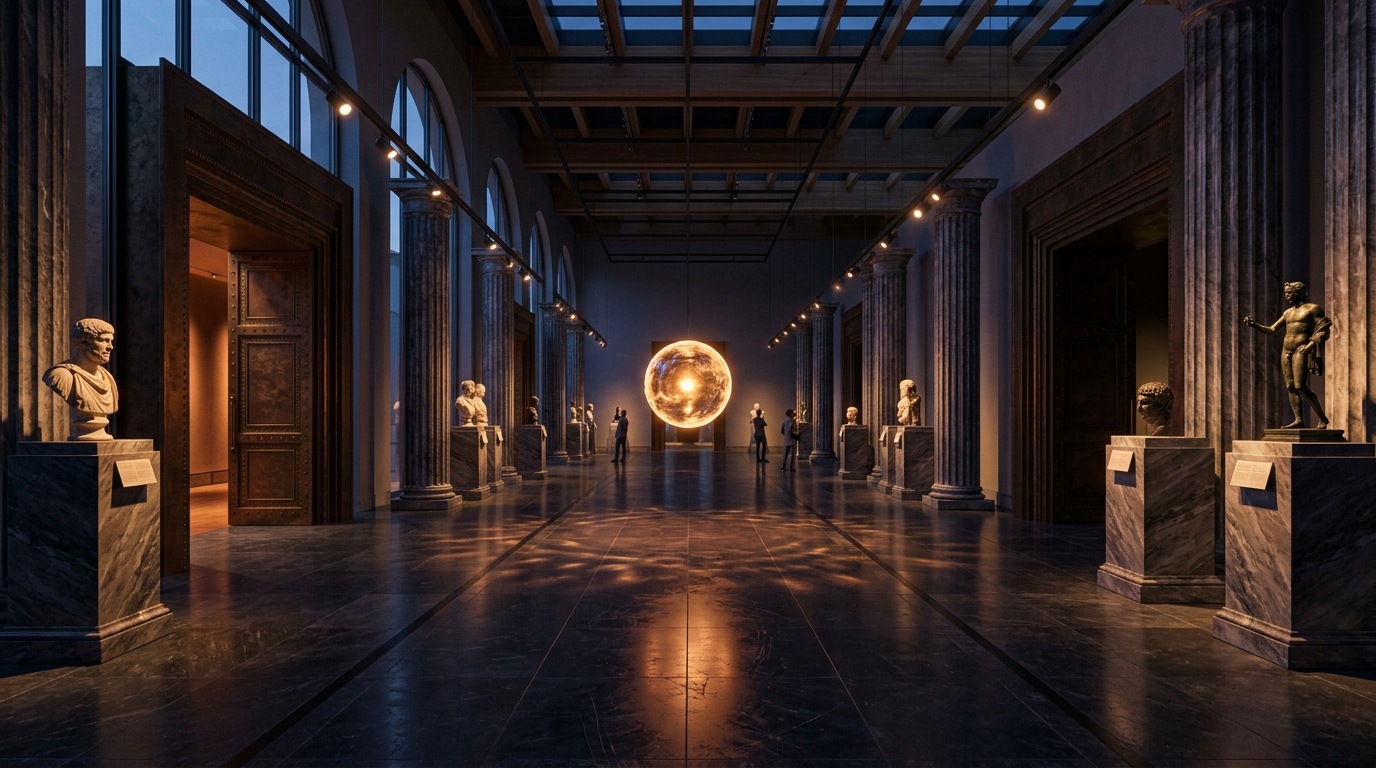
When we set out to build our studio website at Wolfitway, I wanted our digital home to feel like an actual physical place you step inside—not just another flat document you flick your thumb past. I wanted the space to evoke the feeling of walking into a quiet, architectural exhibition hall at twilight: towering stone walls, dramatic spotlights falling onto marble plinths, an ambient acoustic atmosphere, an ethereal guide whose voice physically illuminates the room, and heavy bronze doors in the perimeter walls leading to dedicated chambers.
So instead of building another 2D scroll container, we built a full real-time 3D museum hall right in the browser. You can walk through it live right now at wolfitway.com/museum.
Building a spatial 3D experience for the modern open web comes with severe engineering constraints. If your 3D assets take 15 seconds to download over mobile 4G, users bounce. If your WebGL scene causes mobile GPUs to thermal-throttle and stutter at 18 frames per second, the experience feels like an embarrassing tech demo. If your scene requires a team of 3D artists manually tweaking polygon vertices in Maya or Blender for three months, maintaining the site becomes impossible.
Here is how we engineered the Wolfitway Museum: generating every 3D model as executable Python code in headless Blender, shrinking the entire museum’s geometry below 800 KB with glTF-Transform and meshopt, implementing an adaptive quality governor for mobile hardware, synchronizing spatial lighting with local neural speech synthesis, and rendering cinematic 4K video trailers directly from the website’s own camera engine.
Why build models from Blender scripts instead of by hand?
I am a software engineer, not a traditional 3D digital sculptor. The conventional 3D modeling workflow involves opening Blender’s graphical user interface, selecting vertices, extruding faces, wrestling with subdivision modifiers, and saving 80MB binary `.blend` files into git repositories. Every time a dimension changes or a client requests a different proportion, an artist must manually reopen the file, drag vertices around, re-unwrap UV maps, and re-export.
We abandoned that workflow entirely in favor of "Models as Code." Every single object in our museum hall—the fluted marble exhibition plinths, the architectural colonnade, the lighting sconces, the heavy doorway frames, the hardware pedestal, and the outer room geometry—is a pure Python script located in `models/src/*.py`. We compile our models from the command line using headless Blender:
blender -b -P models/src/plinth.py -- --radius 0.75 --height 1.1 --ribs 32 --out apps/web/public/models/plinth.gltfWriting 3D geometry programmatically provides massive architectural advantages over manual modeling:
- Mathematical precision without mesh errors: Round objects (plinths, sconces, pedestals) are generated using lathe algorithms and rotational profiles. Boxy objects (hardware enclosures, architectural pilasters) are built from mathematically beveled slabs with exact millimeter tolerances. Non-manifold vertices, overlapping coplanar faces, and inverted normals are mathematically eliminated.
- Git-versioned diffs in pull requests: When someone wants to adjust the bevel radius of the exhibition base or increase the rib fluting density, the PR is not a 50MB opaque binary blob. It is a 2-line code review: changing `flute_count = 24` to `flute_count = 32`. You can inspect, review, and roll back 3D geometry just like standard application code.
- Semantic material naming and runtime shader binding: Our Python generators assign explicit semantic material slots to polygon groups (`Mat_PlinthMarble`, `Mat_BrassSeam`, `Mat_DarkOnyx`, `Mat_EmissiveCore`). When three.js loads the glTF scene in the browser, our frontend script traverses the scene graph, matches these material identifiers, and hot-swaps them with custom WebGL PBR shaders, dynamic roughness maps, and environmental reflections.
Here is a simplified excerpt from our plinth generator script (`models/src/plinth.py`), demonstrating how the fluted architectural profile is synthesized using Blender’s BMesh API:
import bpy, bmesh, math

def create_fluted_plinth(radius=0.7, height=1.1, num_ribs=32, bevel_depth=0.03):
    mesh = bpy.data.meshes.new("PlinthMesh")
    obj = bpy.data.objects.new("Plinth", mesh)
    bpy.context.collection.objects.link(obj)
    bm = bmesh.new()

    # Generate rotational profile with sinusoidal fluting
    profile_pts = []
    for i in range(num_ribs):
        angle = (2.0 * math.pi * i) / num_ribs
        flute_indent = 0.02 * math.cos(num_ribs * angle)
        r = radius + flute_indent
        x = r * math.cos(angle)
        y = r * math.sin(angle)
        profile_pts.append((x, y))

    # Extrude cylinder vertically and assign material slots
    # ... (bmesh extrusion and normal smoothing)
    bm.to_mesh(mesh)
    bm.free()
    return obj
How do you get a 3D scene small enough for the web?
The number one reason 3D websites fail on the real web is payload obesity. Many 3D agency sites require 25MB to 80MB of glTF and texture downloads before the camera even moves. Over a spotty mobile 4G connection or an office Wi-Fi with high packet loss, this results in a blank canvas for 10 to 20 seconds. 90% of visitors bounce before the loader finishes.
For the Wolfitway Museum, we set an absolute architectural ceiling: all 3D assets combined—including the hall architecture, the exhibit plinths, hardware pedestals, and decorative fixtures—had to weigh under 800 KB total. That is smaller than a single unoptimized hero JPEG on a standard marketing site.
To achieve this extreme compression ratio without degrading the visual silhouette, our automated build script runs raw glTF exports through a multi-stage glTF-Transform optimization pipeline:
gltf-transform dedup raw_hall.gltf stage1.gltf
gltf-transform quantize stage1.gltf stage2.gltf \
  --quantize-position 14 \
  --quantize-normal 10 \
  --quantize-texcoord 12
gltf-transform meshopt stage2.gltf public/models/hall.glb \
  --level medium
Let us dissect what each stage accomplishes under the hood:
- 1. Deduplication (`dedup`): Identifies identical vertex accessors, textures, and material buffers across different mesh primitives, consolidating duplicate definitions into single shared binary references.
- 2. Vertex Quantization (`quantize`): Standard 3D models store vertex coordinates as 32-bit floating point numbers (4 bytes per component). Quantization normalizes these coordinates into 14-bit and 10-bit signed integers. Because human eyes cannot perceive a sub-millimeter position deviation on a 3D plinth viewed across a room, this instantly slashes vertex buffer sizes by 65% with zero perceptible distortion.
- 3. Meshoptimizer (`meshopt`): Applies vertex cache reordering, triangle overdraw optimization, and byte-level compression algorithms specifically designed for GPU decoding. In the browser, three.js utilizes WebAssembly (`MeshoptDecoder`) to decompress these buffers on a worker thread in under 12 milliseconds.
The real-world file size savings speak for themselves:
- Marble Exhibition Plinth: Raw Blender glTF export: 348 KB. After dedup, quantize, and meshopt: 92 KB (73.5% reduction).
- Architectural Hall & Colonnade: Raw Blender export: 1.82 MB. Optimized delivery bundle: 384 KB (78.9% reduction).
- All 6 Museum Models Combined: Total download weight: 782 KB. The entire 3D world loads in less than 350ms on modern European broadband.
How does it stay smooth on phones?
Desktop gaming GPUs can brute-force WebGL scenes with millions of polygons, 8k textures, and real-time cascaded shadow maps. Mobile devices—such as an iPhone 13 or a mid-range Android phone with a Mali GPU—face strict thermal throttles, memory bandwidth ceilings, and battery constraints.
The museum runs on vanilla three.js r128 without any bulky opinionated framework abstractions. To guarantee fluid 60fps interaction across both a high-end Mac Studio and a four-year-old smartphone, we implement a two-pronged quality system: hardware detection at initialization, followed by dynamic runtime frame-rate governance.
When the visitor enters the page, our setup script evaluates device capabilities before initializing the WebGL renderer:
- Core & GPU Heuristics: If `navigator.hardwareConcurrency` reports 4 cores or fewer, or if the screen width is mobile (<768px), the scene initializes in "Low Quality" mode: dynamic real-time shadows are completely disabled, multisample anti-aliasing (MSAA) is turned off, and the pixel ratio is strictly clamped to 1.0.
- High-Performance Profile: On desktop machines with discrete GPUs and high core counts, the renderer boots with soft PCF shadow maps, 4x MSAA, and pixel ratio clamped to `Math.min(window.devicePixelRatio, 2.0)` to preserve retina clarity.
Hardware heuristics alone are never foolproof. A device might look powerful on paper but struggle under thermal load or background app congestion. Therefore, after an initial 2-second warm-up window, our render loop continuously monitors actual frame pacing:
// Runtime FPS Governor in three.js render loop
let frameCount = 0;
let lastCheckTime = performance.now();

function checkPerformance(now) {
  frameCount++;
  if (now - lastCheckTime >= 2000) {
    const fps = (frameCount * 1000) / (now - lastCheckTime);
    if (fps < 40 && currentQuality === "high") {
      console.info("Downgrading quality to low to preserve smooth navigation");
      renderer.shadowMap.enabled = false;
      renderer.setPixelRatio(1.0);
      scene.traverse(node => {
        if (node.isMesh) node.castShadow = false;
      });
      currentQuality = "low";
    }
    frameCount = 0;
    lastCheckTime = now;
  }
}
If the frame rate drops below 40 fps for two consecutive seconds, the scene quietly downgrades its rendering pipeline on the fly. Shadows are extinguished, shader iterations are simplified, and the frame rate bounces right back to a buttery 60 fps.
We also solved the responsive optics challenge. On a wide desktop monitor, a 60-degree field of view captures the full width of our exhibition plinths. On a tall, narrow mobile portrait screen, a fixed horizontal FOV would cut off the outer plinths. Our camera calculates an adaptive vertical FOV based on aspect ratio: when the screen aspect drops below 1.0, the camera widens its field of view so all three plinths remain perfectly framed without the user having to pan.
How does the narrator voice physically light the room?
A visual gallery without sound can feel cold and detached. But traditional audio on the web is notoriously annoying: loud looping background MP3s that startle users in quiet offices and cause them to frantically hunt down the mute button. We took a radically different approach: an ethereal, ambient narrator generated locally with Kokoro TTS, whose acoustic energy physically drives the lighting in the 3D hall.
Kokoro is an ultra-lightweight, 82M-parameter open-weights text-to-speech model capable of synthesizing naturalistic, studio-quality speech locally without sending data to external cloud APIs like ElevenLabs. We pre-render our narration tracks into compressed OGG and AAC audio streams, preserving clean dynamic range and warmth.
In the center of the museum hall hovers a luminous orb. Instead of relying on a fake, pre-baked animation loop, the orb is connected directly to the browser’s native Web Audio API via an `AnalyserNode`:
// Connecting the Web Audio Analyser to three.js lighting uniforms
const audioCtx = new (window.AudioContext || window.webkitAudioContext)();
const analyser = audioCtx.createAnalyser();
analyser.fftSize = 64;
const dataArray = new Uint8Array(analyser.frequencyBinCount);

// Connect audio source to analyser and speakers
sourceNode.connect(analyser);
analyser.connect(audioCtx.destination);

// In three.js render loop:
function updateAudioReactivity() {
  analyser.getByteFrequencyData(dataArray);
  // Calculate average root-mean-square loudness across voice frequencies
  let sum = 0;
  for (let i = 0; i < dataArray.length; i++) {
    sum += dataArray[i];
  }
  const averageLoudness = sum / dataArray.length;
  const normalizedEnergy = Math.min(1.0, averageLoudness / 128.0);

  // Drive the central orb scale and point light intensity in real time
  orbMesh.scale.setScalar(1.0 + normalizedEnergy * 0.35);
  orbLight.intensity = baseIntensity + normalizedEnergy * 4.5;

  // Propagate expanding sound rings across the marble floor shader
  floorMaterial.uniforms.u_voiceWave.value = normalizedEnergy;
}
When the voice articulates a consonant or rises in volume, the orb flares with intensity, casting dancing shadows across the colonnade. Concentric rings of soft illumination ripple outward across the marble floor like physical sound waves traveling through water. When the narrator pauses between sentences, the room settles back into a calm, gentle amber twilight. The audio is not an afterthought pasted onto the page; it is an active physical light source within the 3D simulation.
Doors, rooms and the Founding Room
The architecture of our 3D space is based on a clean physical metaphor. The central atrium is a public gallery featuring three primary plinths, each showcasing an aspect of our engineering craft: our sovereign infrastructure engine, our autonomous AI media pipeline, and our bespoke direct-to-database commerce architecture.
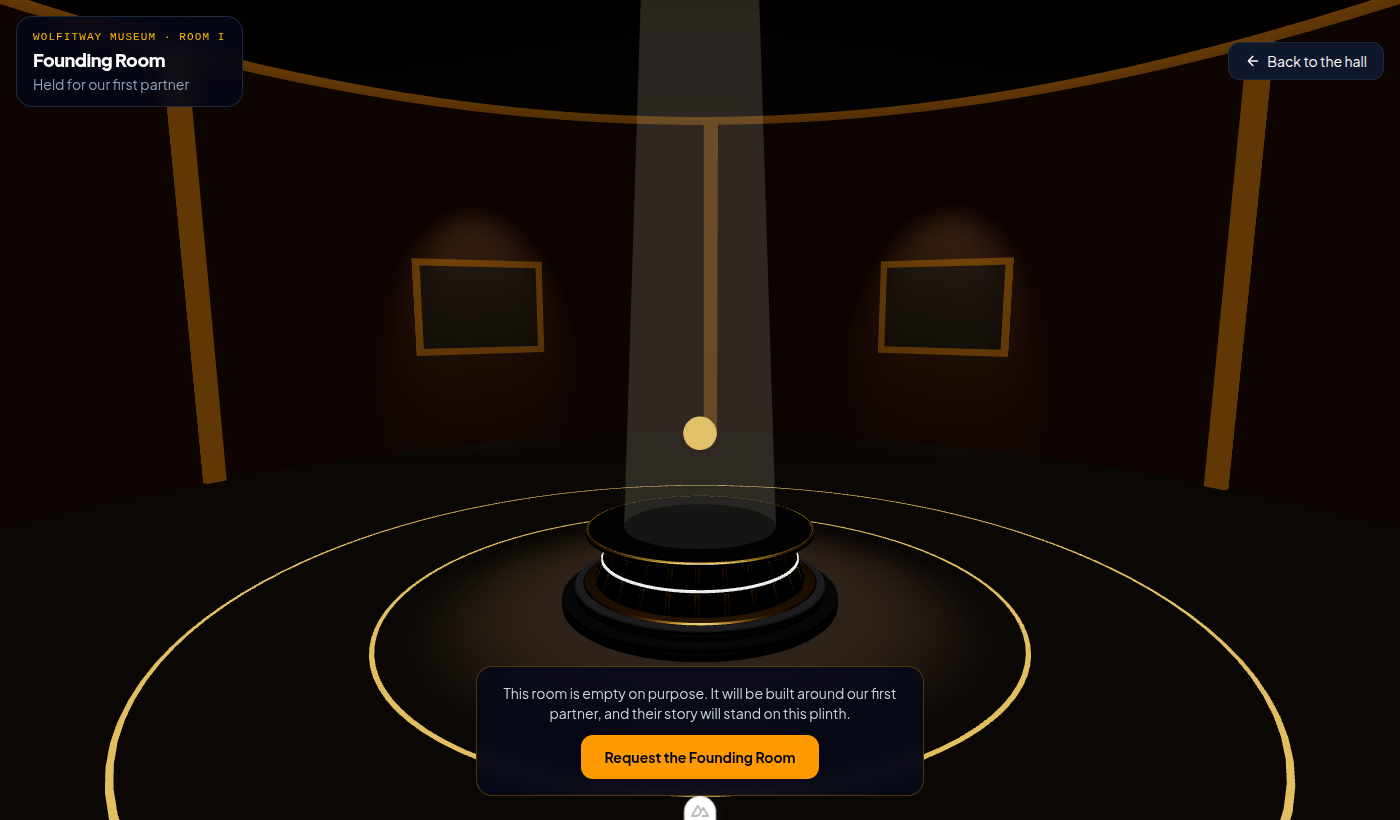
Along the perimeter walls of the hall stand heavy, architectural doorways. These are not ornamental decals; they are portals leading into dedicated, self-contained rooms. Each room is conceived as an immersive, custom-engineered spatial environment built for companies that partner with our studio to showcase their software and engineering milestones.
The first chamber—the Founding Room—is held exclusively for our first flagship partner. It features bespoke lighting acoustics, dramatic camera perspectives, and an interactive spatial installation designed to reflect the partner’s identity and architectural achievements. When a visitor approaches a doorway, the camera eases smoothly toward the entrance, the atrium acoustics gently fade, and the chamber’s spatial experience unfolds.
Notice what is absent: there are no gaudy popups, no intrusive banners, and no corporate sales pitches. The spatial design treats software engineering like fine sculpture.
Film mode: rendering the trailer from the site itself
To launch the museum on social platforms (YouTube Shorts, LinkedIn, X, and Show HN), we needed high-definition cinematic video trailers in both 16:9 widescreen and 9:16 vertical mobile formats. The standard way to produce a web trailer is firing up OBS or QuickTime and recording your screen while moving the mouse.
Screen recording produces terrible results for real-time 3D. Any minor garbage collection pause, background OS notification, or frame jitter is permanently baked into your video. Furthermore, recording at 4K resolution at a rock-solid 60 fps without dropped frames requires a massive workstation, and rendering a separate 9:16 portrait version means manually re-navigating the entire path.
We solved this by turning the website itself into a deterministic offline film studio using our dedicated Film Mode (`/museum?film=1`).
Here is how Film Mode works:
- Deterministic Spline Trajectory: All UI elements, HUD overlays, and interactive mouse listeners are completely stripped. The camera is locked to a smooth Catmull-Rom cubic spline passing through exact 3D keyframe coordinates in the hall, with mathematical easing curves at each exhibit.
- Discrete Frame-by-Frame Stepping: The page exposes an internal function on `window`: `renderFrameAtTime(timestampSeconds)`. Time does not progress according to the real CPU clock. Instead, the page advances time by exactly 1/30th of a second (33.333 milliseconds) per frame call, updating all particle shaders, orb pulses, and camera positions deterministically.
- Headless Chrome & FFmpeg Pipeline: A Node.js script (`models/film.mjs`) launches headless Chromium with exact viewport dimensions (e.g. 3840x2160 for 4K 16:9, or 1080x1920 for 9:16 vertical). For each frame, it instructs the page to advance, captures an uncompressed PNG screenshot buffer via the Chrome DevTools Protocol, and pipes the raw image stream directly into `ffmpeg` via standard input.
# Rendering 16:9 4K trailer directly from the web build
node models/film.mjs --url http://localhost:3000/museum?film=1 --format 16x9 --fps 30 --out flythrough.mp4
Because the pipeline renders frame-by-frame offline, it does not matter if a complex frame takes 1.4 seconds to compute on a software WebGL rasterizer. Every single output frame is rendered with maximum anti-aliasing, full soft shadows, and flawless frame pacing. The final output has zero dropped frames, zero tearing, and looks like an expensive 3D animation produced in Cinema 4D—yet it was generated directly by the live production website.
Open source: the plinth generator (MIT)
To contribute back to the WebGL and creative coding community, we open-sourced the exact Python generator script used to create our exhibition plinths under the permissive MIT license.
The plinth generator lets you synthesize classical fluted architectural pedestals with configurable parameters via CLI flags:
- --radius: Base and top radius in meters (default: 0.75m).
- --height: Vertical height of the column (default: 1.15m).
- --ribs: Number of vertical sinusoidal flutes around the cylinder (e.g. 16, 24, 32).
- --bevel: Chamfer radius on the top and bottom plinth rims.
- --seam: Separates the brass accent ring into an independent material slot for custom metalness shaders.
You can inspect and fork the standalone repository in our open tooling ecosystem. Pair it with glTF-Transform and three.js, and you have an automated 3D asset generation pipeline ready for production web deployment.
How can I walk the museum or request a room?
The best way to evaluate real-time 3D on the web is to experience it directly. You can walk through the museum hall on desktop or mobile right now:
Step inside the hall: wolfitway.com/museum
If you represent an ambitious technology company, developer platform, or creative brand and want to commission a dedicated 3D room within our museum hall—or build a sovereign, high-performance spatial web experience for your own brand—you can request a room directly by contacting our architectural squad.
Looking for high-impact web design without the 3D overhead? Explore our flagship 3-day sovereign landing page sprint: bespoke design, sub-second speed, WCAG 2.2 AA accessibility, and zero platform rent.
Explore the Landing Offer at wolfitway.com/landing →
Ready to ship sovereign tools without recurring SaaS taxes?
Work directly with Dan-Ioan Drăguța. We don't stitch third-party plugins—your product is assembled on bare metal using battle-tested Wolfitway OS sovereign modules (wolf-security, wolf-ai, wolf-crm). You own 100% of the source code, data, and infrastructure.
Written by Dan-Ioan Drăguța
Chief Architect • WolfitwayFounder & Chief Architect of Wolfitway. Building sovereign creator pipelines, autonomous LLM workflows, and direct-to-database commerce systems without third-party vendor lock-in.
Community Discussion
0No community comments yet on this analysis. Share your thoughts above.